
 Polski
 Deutsch

Artificial intelligence is no longer just a vision of the future. Today, it’s actively reshaping the professional landscape, with digital product design at the very center of this revolution. AI is redefining not only the design process itself but also the role of the designer. This change can be positive if we see it as an opportunity for collaboration between humans and AI, rather than as a competition. The key to success lies in combining human intelligence and empathy with the power of algorithms that can support us at multiple stages of our work.
With machine learning and generative models, we can now speed up and streamline almost every stage of the design process – from research and prototyping to the creation of final reports.
Table of Contents
- AI in the Design Process
1.1 Research, Benchmarking, and Market Analysis
1.2 User Research: Preparation and Analysis
1.3 Prototyping and Testing
1.4 Generating Reports, Presentations, and Analyses - New Competencies for UX Designers
- The Power of Collaboration
- References
AI in the Design Process
Research, Benchmarking, and Market Analysis
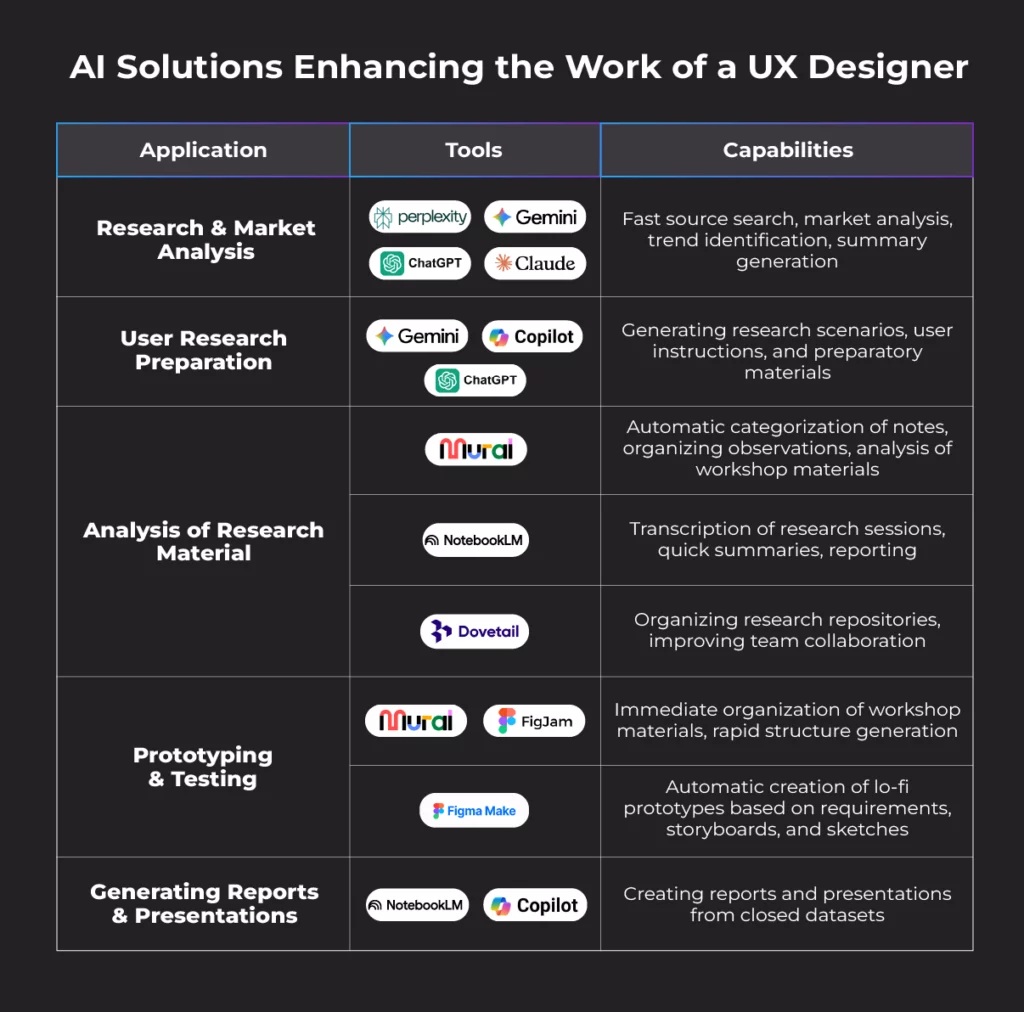
The potential of AI becomes most evident at the early stages of the process. Tools like Perplexity, Gemini, Claude, or ChatGPT can quickly sift through and analyze massive amounts of data, verify sources, and extract the most important insights. They automatically identify patterns, competitors’ strengths and weaknesses, and potential market gaps. The result? A fast, comprehensive, and reliable market overview that provides a solid foundation for the next stages of design.
User Research: Preparation and Analysis
AI can also significantly streamline the research process, though it cannot fully replace it. As before, preliminary research, benchmarking, and pre-study analysis can now be almost entirely automated. AI-based tools excel at this stage – tools like Gemini, Copilot, or ChatGPT can be used to generate research scenarios based on guidelines, as well as user instructions.
Analyzing and organizing research materials after a study is another stage where AI can help. Tools like Mural AI automatically categorize and organize notes and observations, while Notebook LM creates session transcripts and generates summaries, saving researchers a great deal of time.
Some tools, such as Dovetail, also manage research material repositories, which, in larger organizations, make data access and team collaboration much easier. There are also solutions that offer fully automated research analysis without researcher intervention. However, it’s important to remember that algorithms still cannot fully process research sessions, as they rely solely on transcripts. Meanwhile, users do not verbalize every micro-interaction, and even when we encourage them to, they do not describe every thought, emotion, or detail that caught their attention. As a result, these tools lose crucial context.
The least automated part of the research process remains conducting the studies. Although tools offering so-called “synthetic users” are becoming more common, design decisions cannot rely solely on their recommendations. Such an approach does not lead to meaningful solutions. Synthetic users are essentially algorithms based on averaged training data. They act as unifying tools, always aiming for the most universal solution. In practice, they are chimeras composed of millions of behaviors and statistical preferences. These “averaged users” don’t exist in reality, and research results based on them yield flattened, repetitive, and shallow conclusions. The essence of UX research, after all, is discovering the real, specific needs of a target group. We conduct research to understand the user context and design solutions that fit it – something that cannot be achieved by relying solely on synthetic data.
Prototyping and Testing
At the early design stage, AI can rapidly generate simple, lo-fi screen prototypes based on initial assumptions and storyboards. This allows designers to quickly test ideas, gather feedback, and refine concepts before moving on to more detailed work. Until recently, after workshops that generated great ideas, it could take several days to analyze materials and create the first prototypes. Today, tools like Mural AI or FigJam allow workshop data to be collected and preliminarily analyzed almost instantly, and Figma Make can create several simple, working prototypes in just one day.
As Andrew Ng, a renowned scientist, entrepreneur, and one of the pioneers of modern machine learning (co-founder of Google Brain and Coursera, former head of AI at Baidu), notes, it’s valuable to take this opportunity to create multiple preliminary, even rough, prototypes. Ng advocates a practical approach to AI, seeing it as a powerful tool that can automate repetitive stages of the design process. From his perspective, AI is meant to increase designers’ speed, enabling them to explore more concepts in less time. This approach allows designers not only to analyze different solutions in theory but also to see in practice what actually works. However, it’s important to remember that AI excels at recognizing and replicating patterns from training data, which carries the risk of homogenization. Wireframe generators often produce nearly identical layouts, and icon generators can create overly complex forms that diverge from minimalist aesthetics. As a result, many projects appear similar because algorithms are trained on the same or very similar datasets.
Generating Reports, Presentations, and Analyses
AI also supports designers at the final stage of work. Tools like Notebook LM or Copilot can generate reports and presentations based on closed datasets, minimizing the risk of so-called hallucinations. Even here, however, human input remains crucial, as algorithms often produce general recommendations that may be formally correct but not necessarily relevant to a specific project context.
New Competencies for UX Designers
As more design processes become automated by AI, the role of the UX designer is undergoing a clear transformation. Designers now need to expand their skill sets beyond the traditional role of interface creators. They should be able not only to design intuitive solutions but also to interpret AI-generated data and translate it into design decisions that have a real impact on the organization.
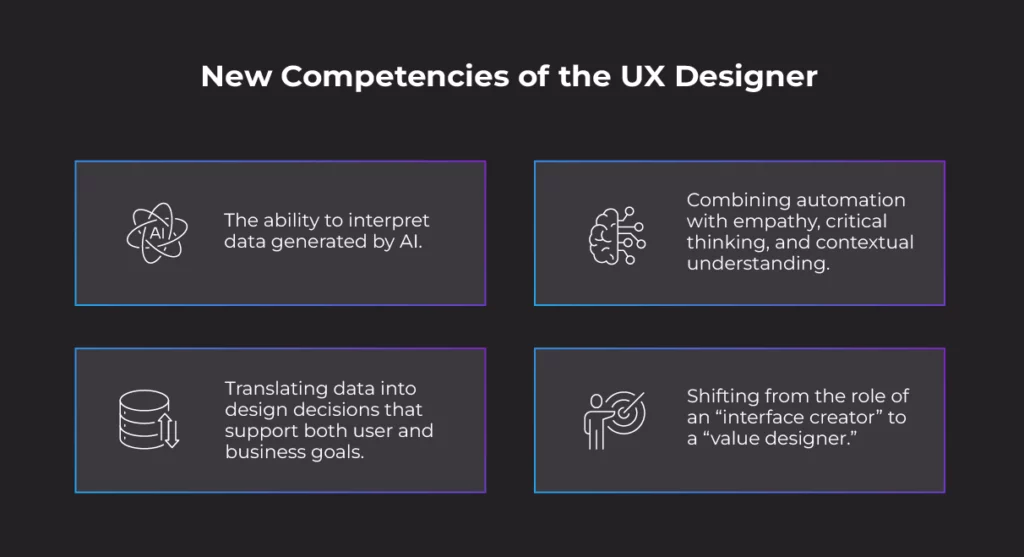
It’s essential that design outcomes go beyond aesthetics and usability, translating into tangible results – improving user experiences, supporting business goals, and increasing product value. In a world where algorithms handle more technical tasks, the ability to think empathetically, analyze critically, and give meaning to designs truly distinguishes a great designer.
The Power of Collaboration
Good UX design is about discovering real, often hidden user needs and addressing them creatively and authentically. This requires empathy, intuition, and the courage to go beyond patterns that AI cannot surpass.
The future of UX design doesn’t mean a world without designers – quite the opposite. It’s a future in which AI automates routine tasks while designers focus on vision, emotions, and strategy. Humans, not algorithms, bring understanding, creativity, and judgment to design – qualities that cannot be programmed.
New roles are emerging, such as the AI Designer, combining design expertise with an understanding of algorithms. An AI Designer is a specialist who develops products and experiences using AI, integrating creativity, design, and technical expertise. Even in this partnership, however, the human remains the architect of the user experience, with artificial intelligence serving as a powerful tool.
Are You Looking for Designers Who Bring AI, Creativity, and Technical Expertise Together in Every Project?
Contact our UXLab Team!FAQ
References
- Siemens Digital Industries Software. AI in Product Development. Available at: https://blogs.sw.siemens.com/digital-transformation/ai-in-product-development/ (Accessed: 12 December 2025).
- AND Academy. AI in UX Design. Available at: https://www.andacademy.com/resources/blog/ui-ux-design/ai-in-ux-design/ (Accessed: 12 December 2025).
- YouTube. AI in UX Design [Video]. Available at: https://www.youtube.com/watch?v=vzflkDRbcbk (Accessed: 12 December 2025).
- STX Next. Designing with AI: Practical Tips for Better User Experiences. Available at: https://www.stxnext.com/blog/designing-with-ai-practical-tips-for-better-user-experiences (Accessed: 12 December 2025).
- Fan, M., Yang, X., Tung, T., Liao, Q. V., & Zhao, J. (2021). Human-AI Collaboration for UX Evaluation: Effects of Explanations and Synchronization. Available at: https://arxiv.org/pdf/2112.12387 (Accessed: 12 December 2025).
- Digidop. How AI Is Transforming the Designer’s Role in 2025. Available at: https://www.digidop.com/blog/how-ai-is-transforming-the-designers-role-in-2025 (Accessed: 12 December 2025).
- Galaxy UX Studio. Effect of AI on UI/UX Design. Available at: https://www.galaxyux.studio/affect-of-ai-on-ui-ux-design/ (Accessed: 12 December 2025).